Transports
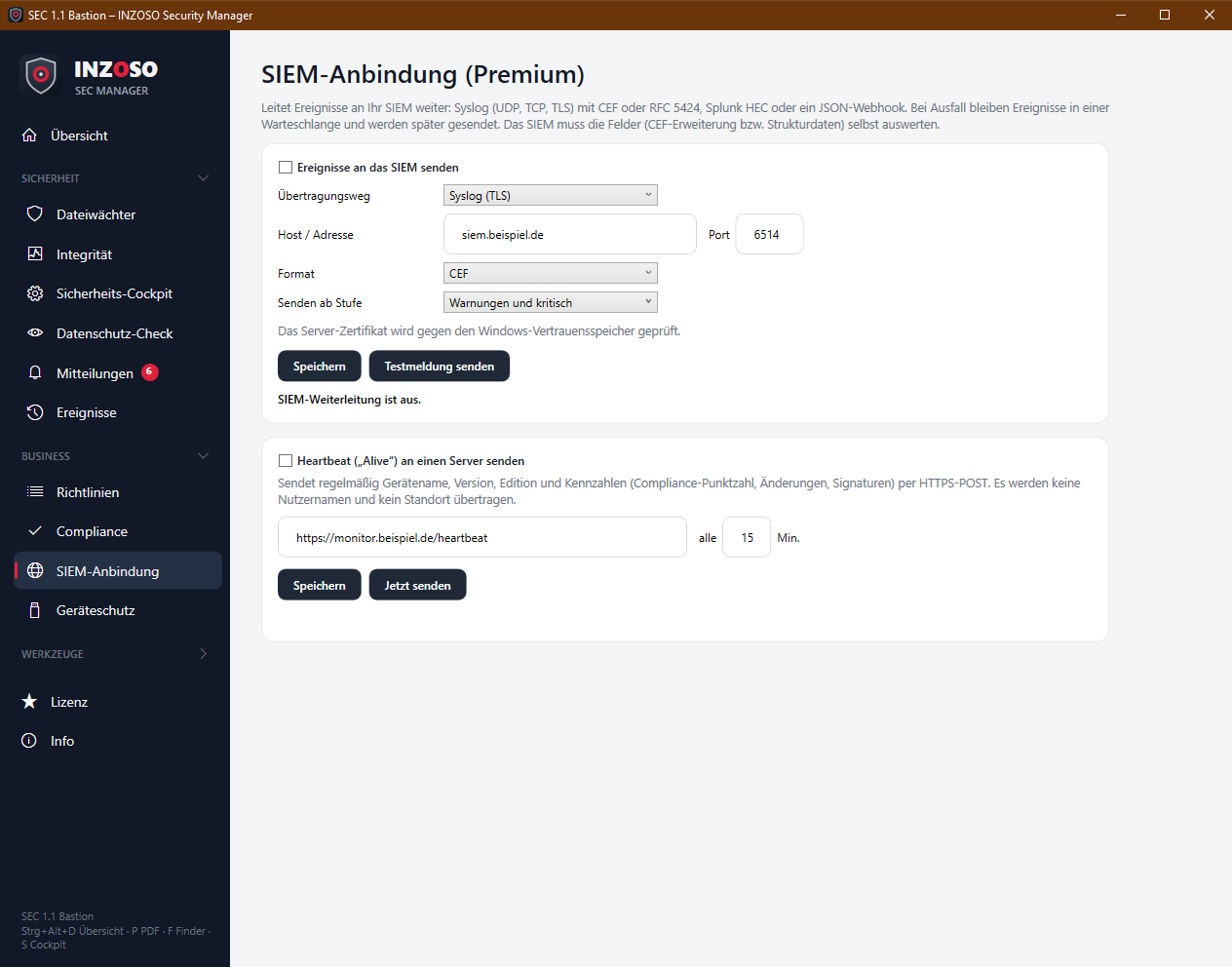
The SEC Manager forwards events to your SIEM (Security Information and Event Management) (Premium, menu Business › SIEM-Anbindung). In addition the PC can send a heartbeat (“alive” signal) regularly. Both are off until you set them up yourself.
- Syslog (UDP): one datagram per event, unencrypted and without acknowledgement, only in trusted networks. Default port 514.
- Syslog (TCP): reliable but unencrypted. Port 514.
- Syslog (TLS): encrypted, the server certificate is checked against the Windows trust store. Port 6514.
- Splunk HEC: JSON over HTTP(S) to the Splunk HTTP Event Collector with a token (Authorization: Splunk …).
- Webhook (JSON): JSON via HTTP(S) POST, optionally with Authorization: Bearer …
Formats
For the syslog transports you choose the format:
- CEF: Common Event Format in a syslog frame, e.g. for ArcSight, QRadar, Splunk, Exabeam, Elastic
- RFC 5424: standardised syslog with structured data, e.g. for Wazuh, QRadar, Microsoft Sentinel
- The SIEM has to evaluate the fields (CEF extension or structured data) itself. The products named are trademarks of their respective owners and appear here only to describe compatibility.
Setup
- Tick “Ereignisse an das SIEM senden”.
- Choose the transport, enter host and port (syslog) or URL (HEC/webhook), and optionally the token for HEC and webhook.
- Choose “Senden ab Stufe”: all events, warnings and critical (default) or only critical.
- “Speichern”, then “Testmeldung senden”. With UDP the protocol does not confirm receipt; check in the SIEM whether the test message arrived.
Reliability
- If the SIEM fails, events stay in a queue (up to 5000, also on disk) and are sent later. The wait grows from 15 seconds to 5 minutes.
- The outage is reported once as a warning, the recovery as info.
- Status line: “Gesendet: n · Warteschlange: n · letzter Fehler/letzte Sendung”. On the overview the “SIEM-Anbindung” tile shows off, connected or failed.
- The SIEM’s own status messages are not forwarded (no feedback loop).
Security of the credentials
The token is stored protected with Windows DPAPI, readable only for your user account on this PC, and never written in clear text to the settings file or a profile.
Heartbeat
The heartbeat regularly sends a small report to your server via HTTP(S) POST:
- host: device name
- time: time (UTC)
- state.version / state.edition: program version and edition
- state.complianceScore: last compliance score
- state.integrityChanges: number of deviations of the last integrity check
- state.signatures: number of loaded hash signatures
- state.monitoring: whether monitoring is running
- No user names and no location are transmitted.
- Setup: tick the checkbox, enter URL and interval in minutes (at least 1, default 15), “Speichern” and “Jetzt senden” to test. An unreachable server is reported once as a warning.
Notes
- Events can contain file paths and device names. Choose target system and minimum level according to your data protection requirements.
- The settings can be distributed to several PCs through a profile (without the token).