INZOSO WORK MANAGER
Time tracking that detects work.
The WRK-Manager detects when you work, asks instead of guessing and takes documentation and timesheets off your hands. All data stays local on your PC and you decide what is logged.
HOW IT WORKS
Detect. Ask. Document.
Create rules
You define what counts as work: a program such as excel.exe, a website such as “Jira” or a system such as “SAP”. “Aus offenen Fenstern” (from open windows) helps you pick.
Ask and record
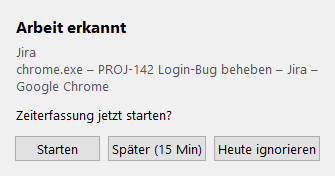
When such a window becomes active, a prompt appears at the bottom right: start, later (15 min) or ignore today. Time runs in the background and the tray icon shows the status.
Stop and document
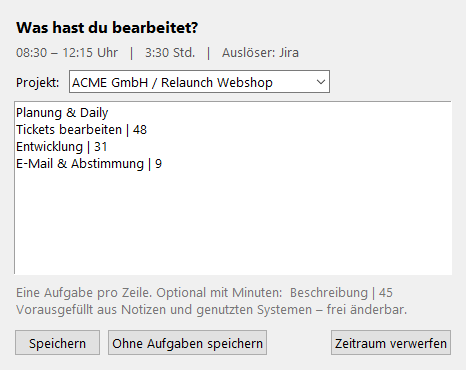
When you stop, the WRK-Manager asks what you worked on: one task per line, optionally with minutes. That becomes the timesheet entry.
THE DIALOGS
Nothing is decided secretly
STANDARD
What the Standard scope includes
Detection rules
Program (process name), website (window title or domain) and system, with several patterns per rule separated by semicolons.
Asking instead of guessing
Start, ask again later or ignore today. If you do not react, the prompt closes after 2 minutes and counts as “later”.
Timesheet
View, edit, add and delete entries, with filters for today, week and month and the total at the bottom.
CSV export
Semicolon-separated, UTF-8 with BOM, so the file opens correctly in German Excel straight away.
Tray icon and autostart
The program keeps running in the notification area when you close the window and optionally starts minimised with Windows.
Browser extension
Optional for Chrome, Edge, Brave and Firefox: with the domain of the active tab, rules such as “wiki.firma.de” work reliably.
PREMIUM
Additionally with a Premium key
Idle time and lock screen
After long inactivity or a locked PC the WRK-Manager asks what should happen to the time instead of pausing automatically.
Record retroactively
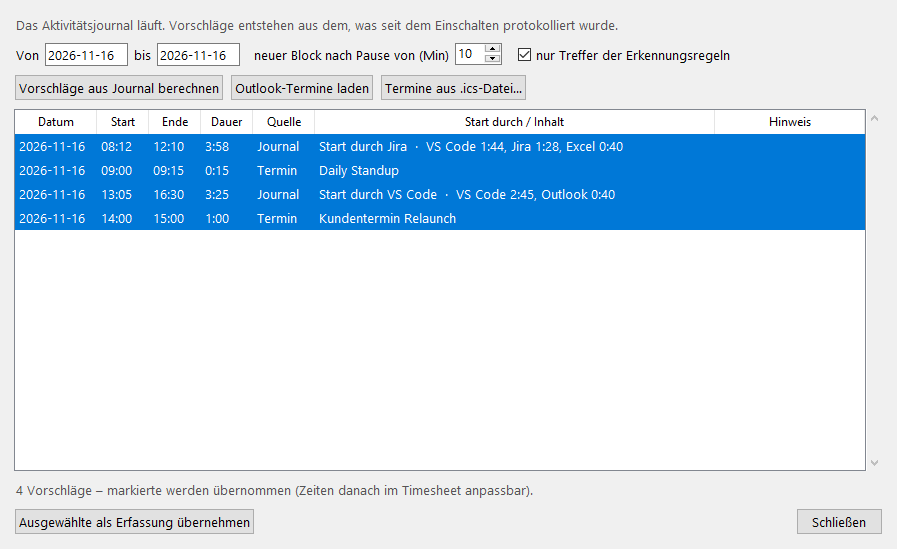
The activity journal suggests work blocks with start times, plus appointments from Outlook or an .ics file. You just confirm.
Projects and billing
Projects and clients with an hourly rate, evaluation by hours and amount, export as CSV and Excel.
Working-time check
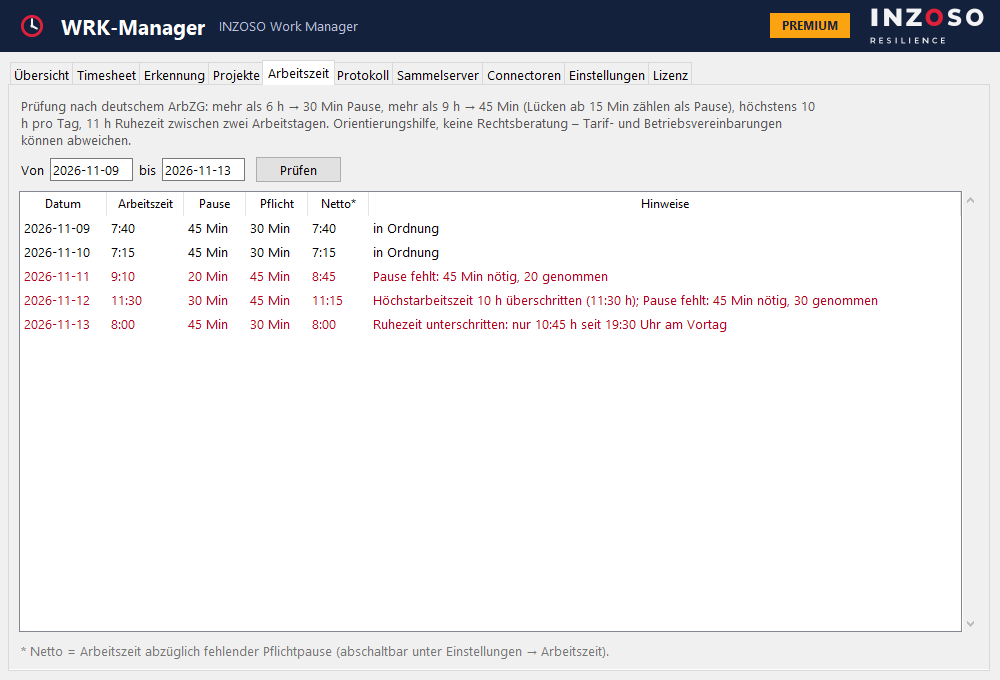
Notes on breaks, maximum working hours and rest periods under German working-time law, as guidance.
Excel, PDF and import CSV
An Excel file with several sheets, the PDF report “Arbeitszeit-Bericht” and an import CSV for tools such as Clockify or Toggl.
Personal log and collection server
Evaluate window events of your own logs and store timesheets centrally via FTP, FTPS, SMB or WebDAV.
Connectors (beta)
Hand times to Jira, Tempo, Microsoft Teams, Microsoft 365 calendar, Clockify, Toggl or by webhook, DATEV as a file export.
PREMIUM IN PICTURES
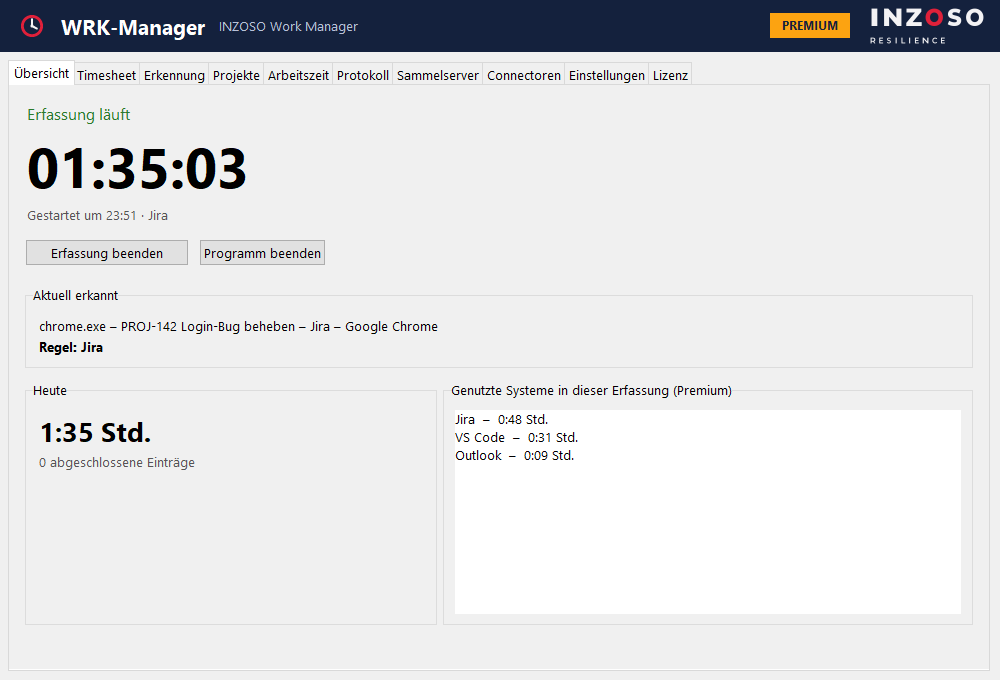
Retroactive recording and working time at a glance
PRIVACY
You decide which data is taken over
- Everything stays local. The data is in a SQLite file on your PC. There is no account, no registration, no telemetry, no update check and no license lookup.
- Network only at your request. Connections only arise when you set up a collection server or a connector yourself.
- Journal and log are opt-in. With an exclusion list for programs (pre-filled with password managers), a retention period and a delete function.
- What is not recorded. No screen contents, no keystrokes (only when the last input was) and no document contents.
EDITIONS
Standard without a key, Premium with a key
Without a license key the WRK-Manager runs in the Standard scope. With a valid Premium key the Premium functions are unlocked. The check is offline; there is no license server and no online activation.
Premium costs a one-time 29 €. We handle the purchase personally: please get in touch.
- All Premium features
- One-time, no running costs
- Unlocked offline with a license key
- Purchase on request
Downloading the installer is possible independently of this.
TO BE HONEST
Good to know
- Early version. The WRK-Manager has the version number 0.2.0. Features and their assignment to Standard and Premium may change.
- Connectors are beta. They are our own integrations through public interfaces. They were tested against simulated servers, not yet extensively against the real services, and are not certified or approved by the vendors. The DATEV connector only writes a CSV file; it is not a DATEV interface.
- Working-time check. Guidance under German working-time law, not legal advice. Collective and works agreements may differ.
- Windows only and German only. Windows 10 and 11 (64-bit). There is no version for macOS, Linux or mobile devices, and the program interface is in German.
- No team features. There is no cloud synchronisation and no central management of several users.
GET STARTED
Try it out
Frequently asked questions
Which data does the WRK-Manager collect?
The active window (program name, optionally title and domain), times of start, stop and idle, and your own entries. Journal and personal log are optional. Everything is local, and you can exclude programs, switch off titles and delete everything.
Is anything sent to the internet?
No, unless you set up a collection server or a connector yourself. There is neither telemetry nor a license server.
Does the WRK-Manager record what I type or see on screen?
No. It only sees program name and window title and whether there was an input recently (for idle detection).
What happens if I forget to start?
Detection asks as soon as a work window becomes active. With Premium you can additionally use the journal and take times over retroactively from suggestions.
What does the WRK-Manager cost?
The Standard scope runs without a license key. Premium costs a one-time 29 €. To buy it, please get in touch.
Does the Standard scope need a key?
No. Without a key the Standard scope runs. Premium is unlocked offline with a key.
Is the working-time check legally binding?
No. It is guidance under German working-time law.
Is there a version for Mac or Linux?
No, currently only Windows 10 and 11 (64-bit).
What happens to my data when I uninstall?
It stays in the folder %APPDATA%\INZOSO\WRK-Manager until you delete it.
Next step
Questions about the Work Manager?
Want to get Premium or have questions about using it? Write to us and we will get back to you personally.
Request a conversation