INZOSO MICROPAM SERVER MANAGER

Server access under control.
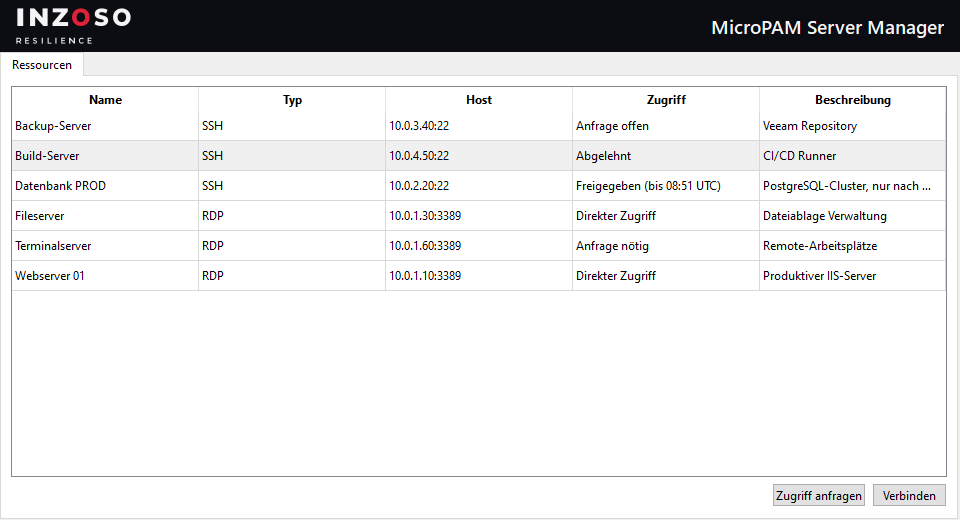
Every employee signs in with their own user account and sees a list of RDP and SSH servers. Some are available directly, for others they request access, and an approver releases it with a click for a set time. The server credentials do not have to be passed on.
WHAT IT IS ABOUT
The SRV-Manager program, the PAM principle
The program is called SRV-Manager, runs locally on Windows and works with a central database so that several workstations see the same resources and approvals. PAM stands for “Privileged Access Management”, the management of privileged access.
Ideal for IT departments and service providers who want to grant server access traceably and for a limited time.
HOW IT WORKS
Your first access in four steps
Install and set up the database
Install the SRV-Manager and choose the database: local file or PostgreSQL. Also set the master password and create the first admin.
Create resources and users
The admin creates servers with host, port, user and password and creates users with roles.
Sign in and request
Directly approved servers start with a click. For all others the user submits a request with a reason.
Approve and connect
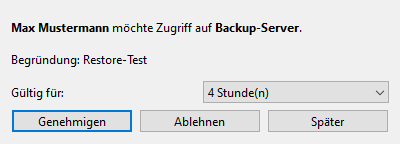
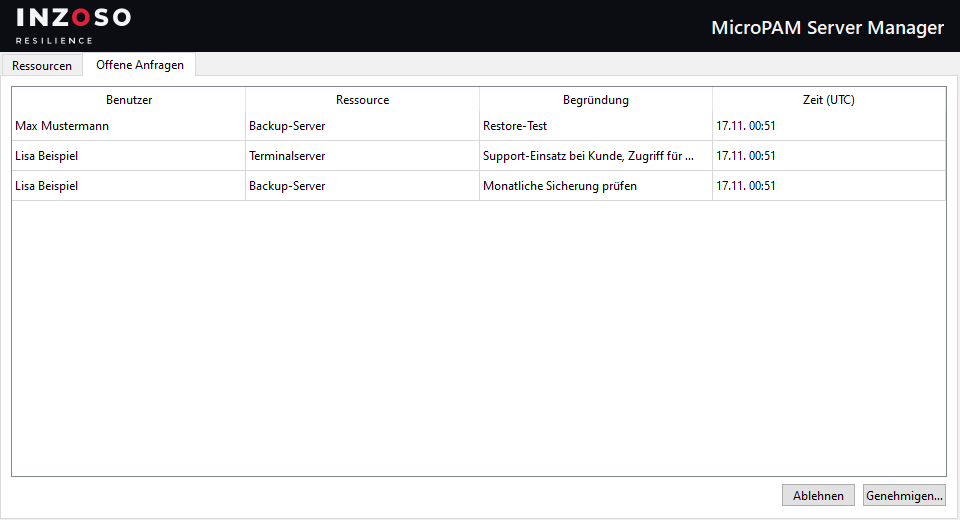
The approver sees the request immediately as a pop-up and approves it for 1 to 168 hours or rejects it. After that the user connects with a click.
FEATURES
What the SRV-Manager can do
RDP and SSH
Resources with name, host, port, user, password and description. Connections are made with one click via Windows Remote Desktop (mstsc) or Windows OpenSSH.
Direct access or request
Per resource you decide: all users may connect directly, or access must be requested and approved.
Request workflow
Request with a reason, pop-up for approvers and time-limited approval. The user sees the status: direct access, approved (until …), request required, request open or rejected.
Encrypted credentials
Server passwords are stored encrypted in the database (Fernet/AES, key from the master password). User passwords are stored only as a hash.
Central database
Either a local SQLite file (also on a network drive) or a central PostgreSQL server for several workstations.
Logging
Sign-ins, requests, decisions, connections and changes to resources are recorded in the database with timestamp and user.
ROLES
Three roles, clear tasks
- Admin. Creates and manages resources and users. An admin does not connect to servers themselves.
- Approver. Has access to all resources and decides on requests.
- User. Connects to approved resources or requests access.
APPROVAL
Requests at a glance
PRICE
The SRV-Manager is Free.
The INZOSO MicroPAM Server Manager is free of charge (Free). You download the installer and use all features described here.
A Premium edition is planned for the future. There is no information on features or dates yet.
- All features described
- Download without sign-up
- Installation without administrator rights possible
- Premium edition planned
LIMITS
What you should know
- No assignment per user or group. Access is controlled per resource: “Direkter Zugriff” or “Anfrage nötig”.
- No display of the log in the program. The log is already written to the database; there is no interface for it yet.
- No Active Directory or LDAP integration. No single sign-on and no two-factor sign-in either.
- No session recording. Connections run through mstsc (RDP) and OpenSSH (SSH).
- An expiring approval does not end running sessions. It only blocks new connections.
- Windows only. There is no web or mobile version. The installer is not code-signed, Windows SmartScreen may warn.
- Security notes. While connecting, the RDP password briefly appears in the cmdkey command line and the SSH password sits on the clipboard for 30 seconds. Details in the security article.
REQUIREMENTS
What you need
- Windows 10 or 11 (64-bit). About 150 MB of free disk space. The installer contains everything needed, Python is not required.
- For RDP: the Remote Desktop client mstsc, included in Windows.
- For SSH: the Windows OpenSSH client, usually preinstalled on current Windows versions.
- For multi-workstation operation: a reachable PostgreSQL server or a network drive.
GET STARTED
Try it out
Frequently asked questions
What does the INZOSO MicroPAM Server Manager cost?
The Free edition is free of charge. A Premium edition is planned for the future; features and dates are not fixed yet.
Which systems can I access?
Servers via RDP (Remote Desktop) and SSH. The SRV-Manager launches the Windows programs mstsc and OpenSSH for this.
Do I need a database server?
No. For one workstation or a team with a shared network drive a local SQLite file is enough. For several workstations with a central database there is a PostgreSQL connection.
Are the credentials protected?
Server passwords are stored encrypted in the database. While a connection is being made, however, they briefly sit in the Windows vault or the cmdkey command line (RDP) or on the clipboard for 30 seconds (SSH). Whoever gets access can technically see the password. The security article gives details.
What happens if I forget the master password?
It cannot be reset; the stored server passwords are then unreadable. Keep it safe.
Is there Active Directory integration or two-factor sign-in?
No, neither is part of the Free edition.
Next step
Questions about MicroPAM?
Would you like a feature or want to know how the SRV-Manager fits into your environment? Write to us.
Request a conversation