INZOSO SECURITY MANAGER

Your PC’s protection at a glance.
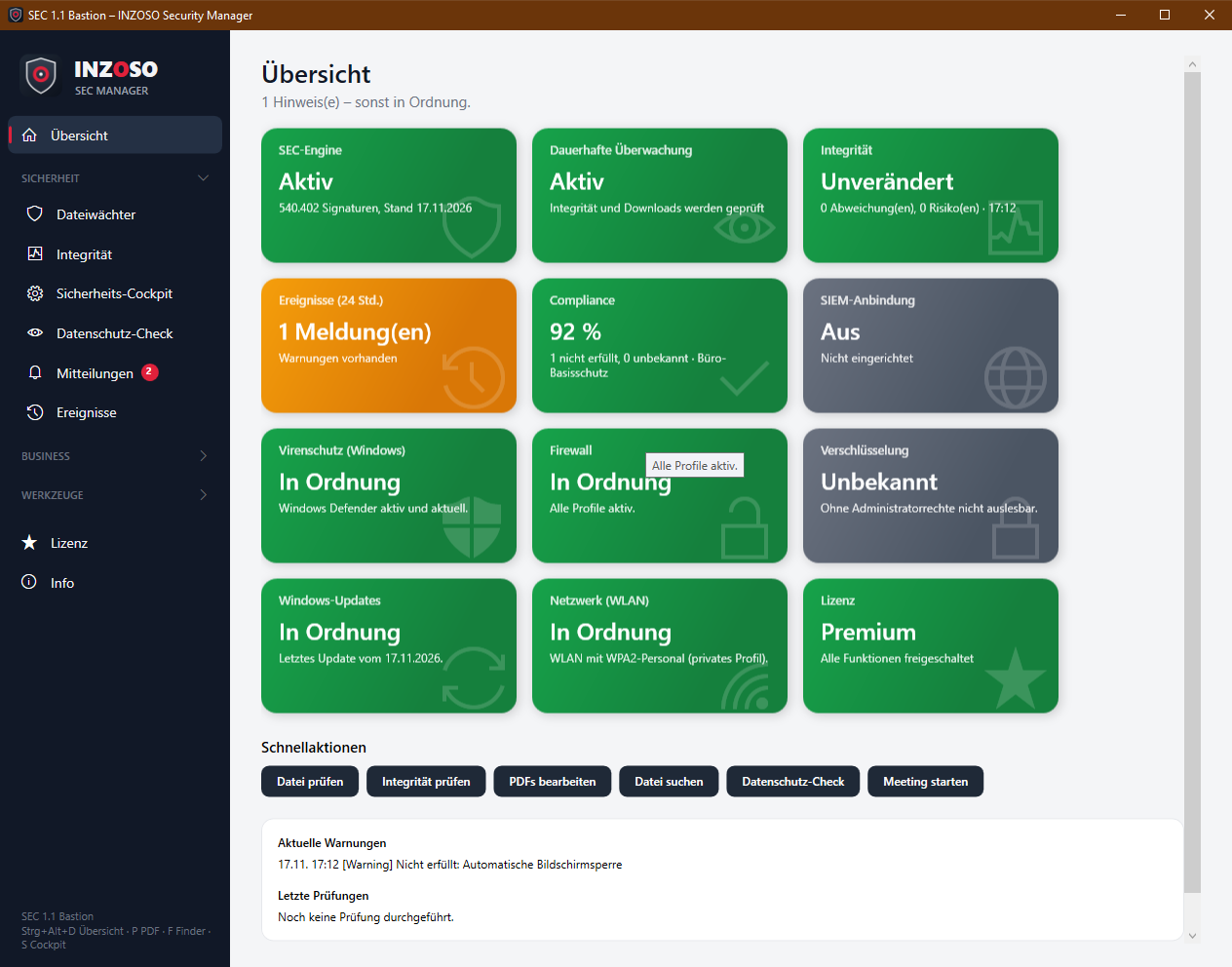
The SEC Manager checks files and the state of your Windows PC locally, reports anything unusual clearly and brings tools for everyday office work: PDF, file search, vault and metadata cleaning. It complements your antivirus and does not replace it.
FEATURES
What the SEC Manager does
Protection
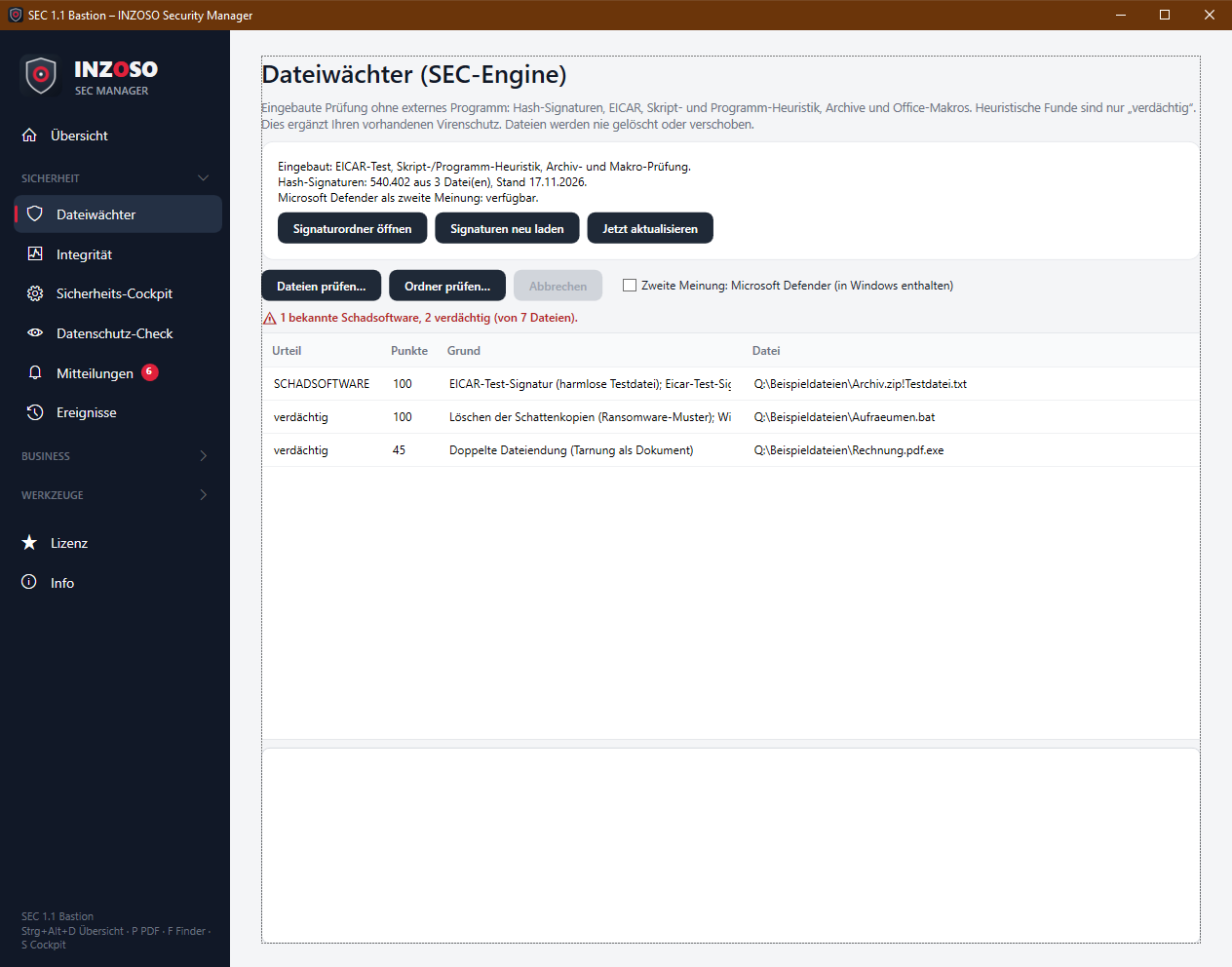
Its own antivirus scanner (SEC engine) with signatures from the ClamAV database, heuristics and archive and macro checks. Optionally Microsoft Defender gives a second opinion.
Integrity
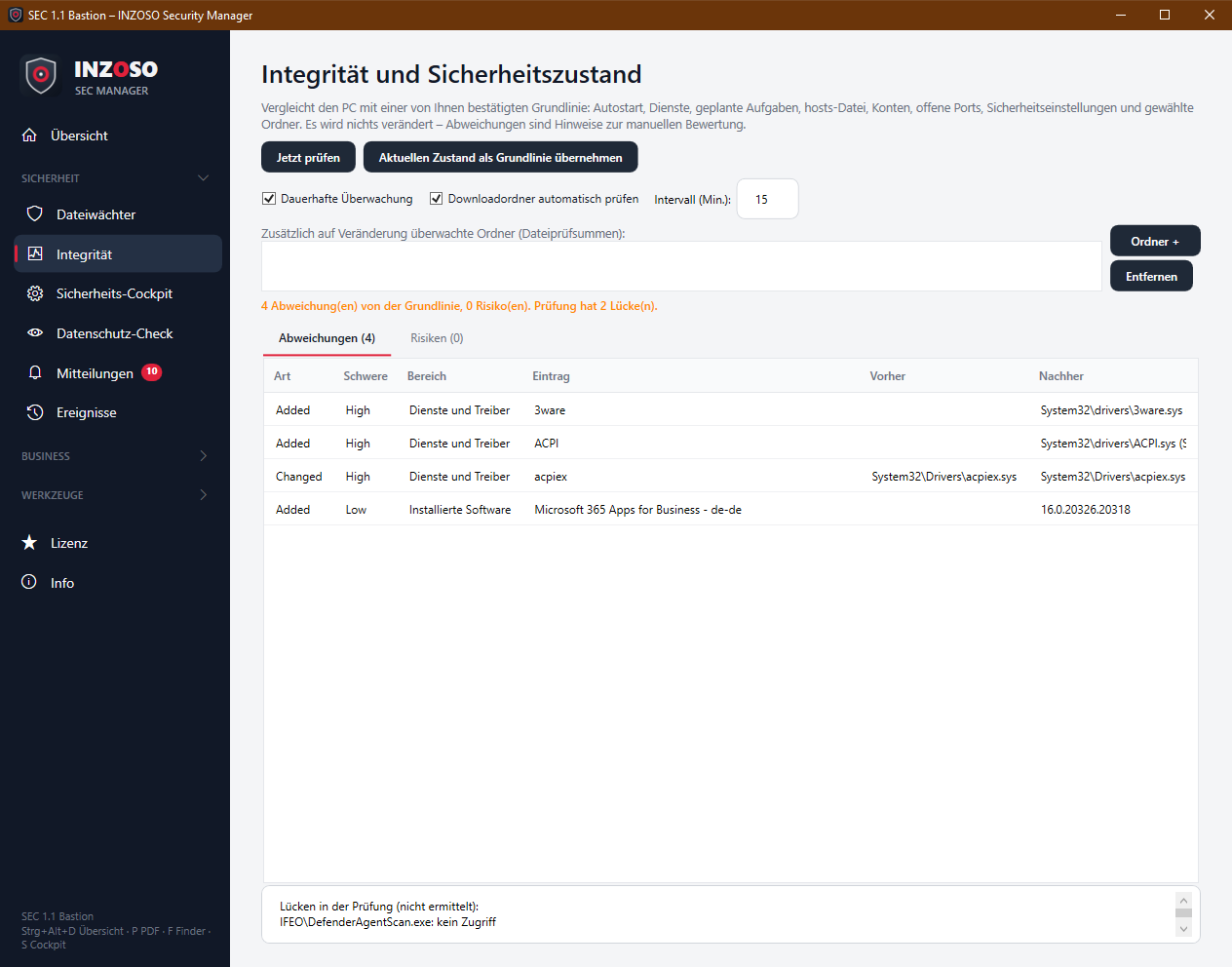
Compares the PC with a baseline you confirmed: autostart, services, scheduled tasks, hosts file, accounts, open ports, security settings and software.
Overview
Security cockpit and overview with status tiles for antivirus, firewall, encryption, updates, Wi-Fi and compliance.
Privacy
Finds IBANs, card numbers, email addresses, phone numbers and credentials in text files.
Messages
Its own pop-ups, tray icon with a status dot, notification center and weekly report.
Business
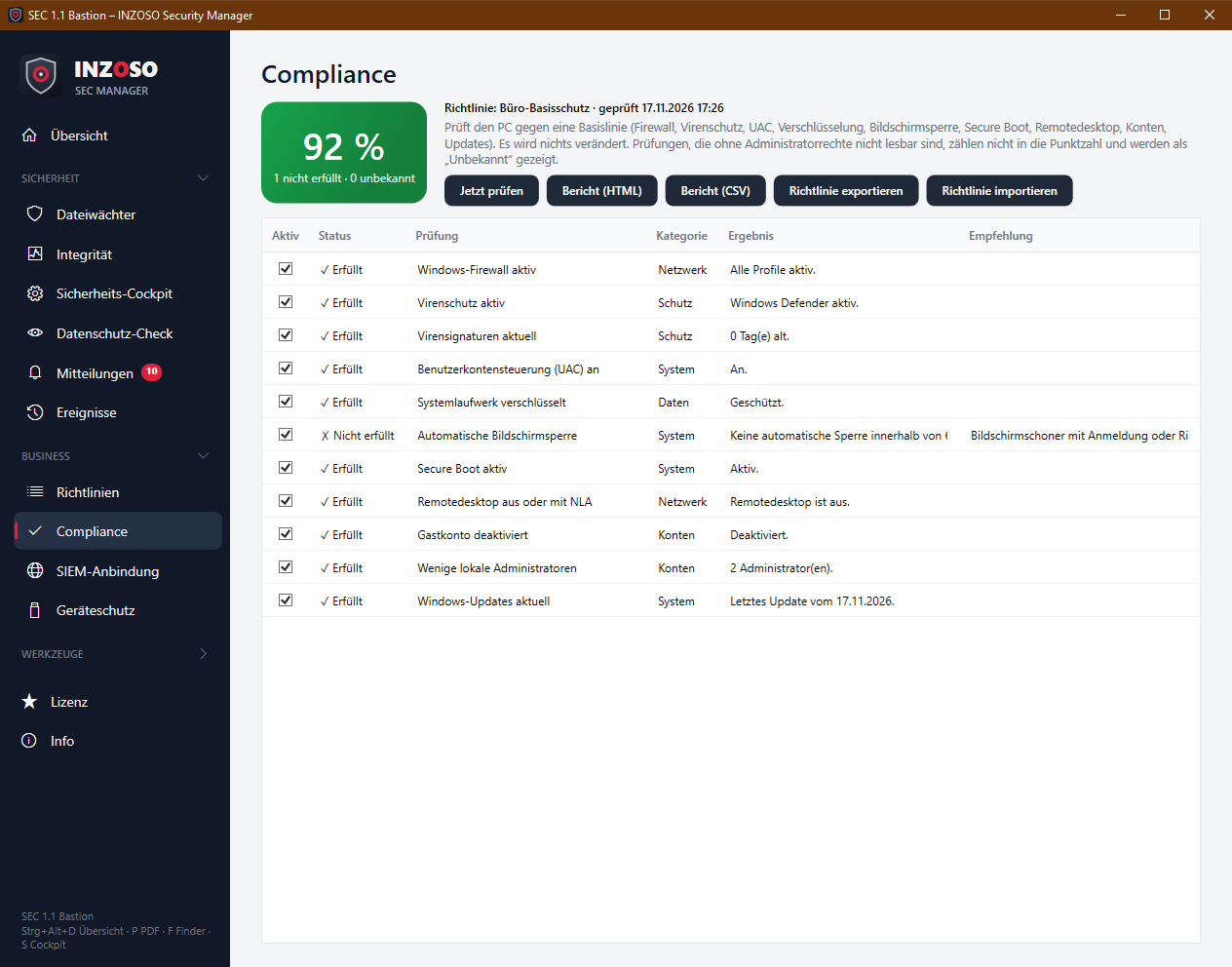
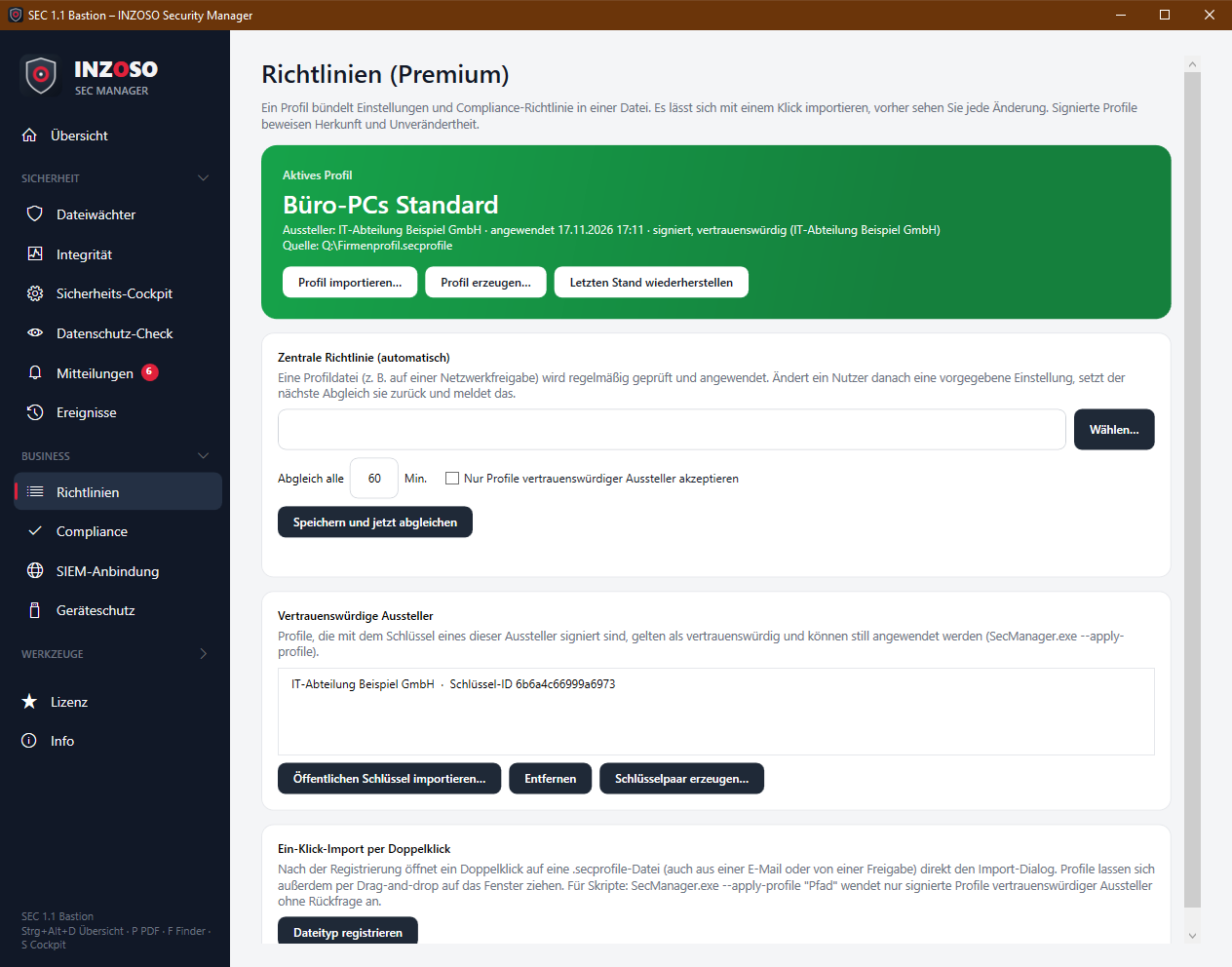
SIEM connection, compliance check with reports, policy manager with signed profiles, USB and ransomware protection and heartbeat.
Tools
Merge, split, rotate and compress PDFs, file finder, presentation mode, vault (AES-256) and metadata cleaning.
PRINCIPLES
How the program works
- Local first. Files are checked on your computer and not uploaded to external services.
- Originals stay. Results such as split PDFs, cleaned documents or encrypted files are always saved as a new file.
- See changes beforehand. Profiles, cleanings and actions show what will change before you apply them.
- Nothing is deleted automatically. Suspicious or sensitive files are reported but neither deleted nor moved.
- Honest messages. Errors, outdated signatures and incomplete checks are shown clearly. “Unknown” means: could not be determined, not: fine.
- A complement, not a replacement. The SEC Manager complements your existing antivirus. A scan with no hits is not a security guarantee.
IN PICTURES
Virus check and integrity
BASIS
What you can use without a license
Security cockpit and overview
Status tiles for antivirus, firewall, encryption, updates and Wi-Fi, each with a next step.
File guard, manual
Checking files and folders with signatures, heuristics, archives and macros, plus manual signature updates.
Integrity, manual
Check against the baseline and display of the risks.
Privacy check
Searches text files for sensitive content. Values are masked.
Messages and events
Pop-ups, tray status, weekly report, tips and event log.
Tools
Merge, split and rotate PDFs, file finder and viewing metadata.
PREMIUM
Additionally with Premium
Continuous monitoring
Integrity check in the background, automatic check of the download folder, monitored folders with checksums and software inventory.
Automatic signature updates
The signature set updates every 4 hours, plus Microsoft Defender as a second opinion if you like.
Business
Compliance check with HTML and CSV report, SIEM connection with heartbeat, policy manager with signed profiles and device protection (USB check, ransomware warning).
Tools
Compress PDFs, vault (AES-256), clean metadata and presentation mode.
BUSINESS IN PICTURES
Compliance and policies
EDITIONS
Basis without a license, Premium with a license code
The Basis edition can be used without a license and is free of charge. A Premium license unlocks the additional features. The license code is checked locally; no internet connection is needed.
Premium costs a one-time 59 €, with no subscription and no running fees. We handle the purchase personally: please get in touch.
- Continuous monitoring and business features
- Vault, metadata cleaning, PDF compression
- License check local, no internet
- Purchase on request
You can use the Basis edition independently of this.
AUDIENCE
Who the program is for
- Individual users and small offices. Anyone who wants a clear view of their own PC’s state.
- Companies. Anyone who checks workstations against a security baseline, routes events to a SIEM and wants to distribute settings through a signed profile.
TO BE HONEST
Limits you should know
- Not a replacement for your antivirus. The SEC Manager has no complete real-time protection. It checks on request and, with Premium, new downloads and newly connected USB drives.
- Narrower detection than ClamAV itself. Hash signatures (over 540,000) and heuristics are evaluated. The pattern, logic and PE signatures of the ClamAV database are not evaluated yet.
- Signatures are not part of the package. You load them through the official tool cvdupdate (Python required) or place ClamAV files by hand.
- Report, not enforce. Integrity, compliance and the ransomware warning only report. They do not stop processes, restore files or change Windows settings.
- Windows only and German only. Windows 10 and 11 (64-bit). Developed and tested under Windows 10; Windows 11 has not yet been tested in practice.
- Not code-signed. Windows SmartScreen may therefore show a warning.
- Works council and data protection. You should clarify continuous monitoring, USB checks, the ransomware warning and SIEM forwarding on workstation PCs according to the rules that apply in your company.
REQUIREMENTS
What you need
- Windows 10 or 11, 64-bit. No administrator rights needed. Some checks show “Unknown” without them.
- Storage. Program about 72 MB, virus signatures about 150 MB, about 110 MB of memory for the signatures while running.
- Optional: Python. Only for updating the virus signatures with cvdupdate.
GET STARTED
Try it out
Frequently asked questions
Does the SEC Manager replace my antivirus?
No. It complements an existing antivirus such as Windows Defender. It has no complete real-time protection, and a scan with no hits is not a security guarantee.
Are my files sent to a server?
No. All checks run locally. The program only connects when you trigger signature updates or set up SIEM or heartbeat yourself.
What does the SEC Manager cost?
The Basis edition can be used without a license and is free of charge. Premium costs a one-time 59 €. To buy it, please get in touch.
Do I need administrator rights?
No. The program runs with normal user rights. Some checks, such as scheduled tasks, show “Unknown” without administrator rights. That is displayed and does not mean “fine”.
Is anything deleted automatically?
No. Suspicious or sensitive files are reported but neither deleted nor moved. You decide.
Does the SEC Manager run on macOS or Linux?
No, only on Windows 10 and 11 (64-bit).
Next step
Questions about the Security Manager?
Want to get Premium or know how the SEC Manager fits into your environment? Write to us.
Request a conversation