Presentation mode: profiles
With presentation mode (Premium, menu Werkzeuge) you prepare meetings: a meeting profile starts the needed programs and documents, tidies the desktop and checks text documents beforehand for visible sensitive content. There are no pop-ups during the meeting. When it ends, the previous state is restored as far as possible. Your profiles are on the left (“Neu”, “Löschen”), on the right you edit the selected one:
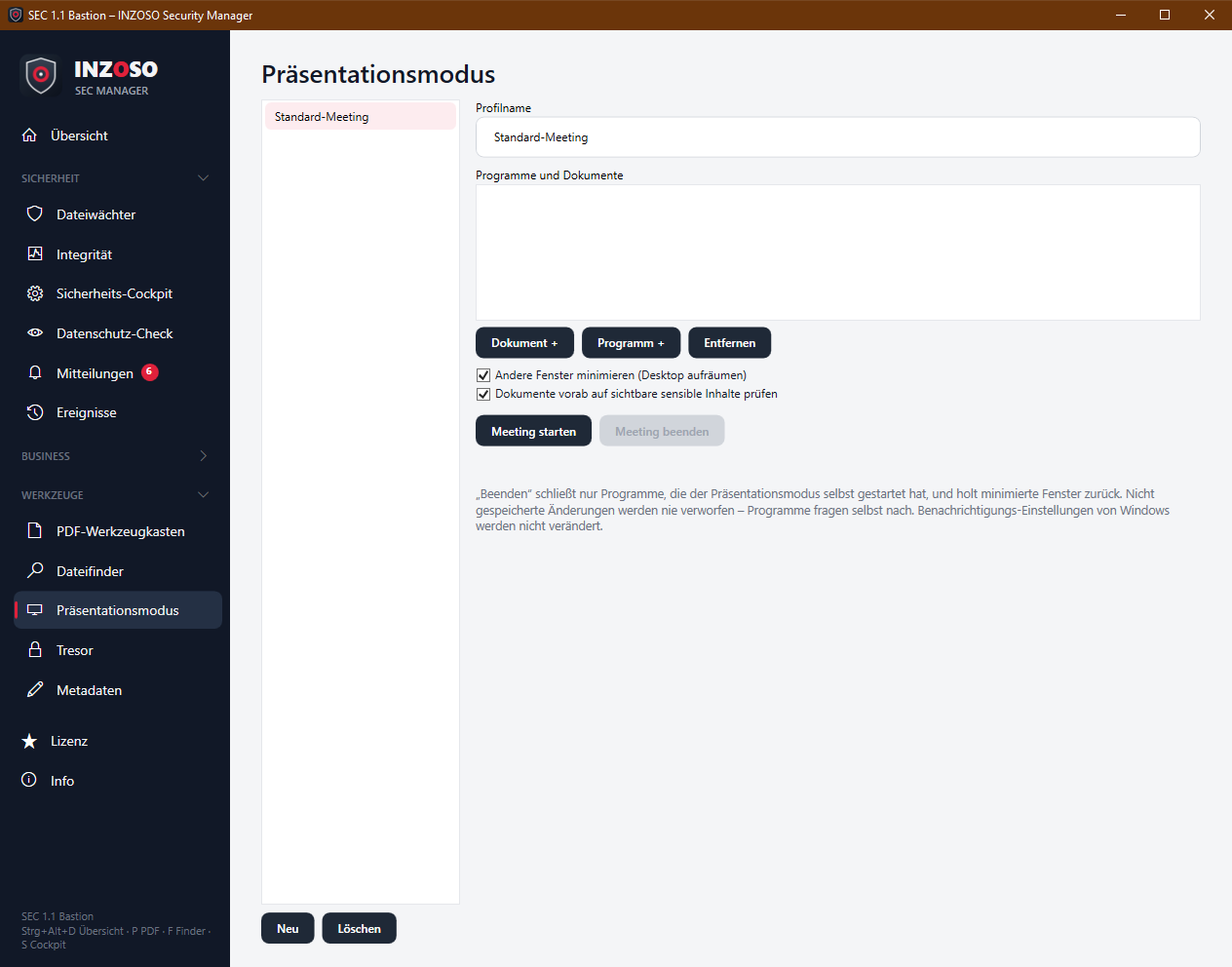
- Profilname: name of the meeting
- Programme und Dokumente: list of items opened at start. “Dokument +” chooses files, “Programm +” an .exe, “Entfernen” removes an item.
- Andere Fenster minimieren: hides all windows at start (equivalent to Windows key + D). They are shown again at the end.
- Dokumente vorab auf sensible Inhalte prüfen: checks the documents in the list with the privacy check before they are shown.
- The profiles are stored locally in profiles.json.
Presentation mode: procedure
- “Meeting starten.” A prompt names the items and whether other windows are minimised.
- The SEC Manager starts the items. A report shows how many were started, whether something failed and, if enabled, possible sensitive content in the documents (file, line, type, masked value) that you should check before sharing.
- During the meeting pop-ups are muted (“do not disturb”), messages land in the notification center.
- “Meeting beenden.” The SEC Manager politely closes only the programs it started itself and shows the windows again. Unsaved changes are never discarded, the programs ask themselves. Afterwards a message reports how many messages arrived during the meeting.
- The check for sensitive content covers only text documents, not Office or PDF files. Other programs are never closed, only minimised and restored. Windows’ notification settings are not changed.
Vault: encrypting
The vault (Premium, menu Werkzeuge) encrypts files locally with AES-256-GCM. The original stays; you delete it yourself once you have checked the encrypted file.
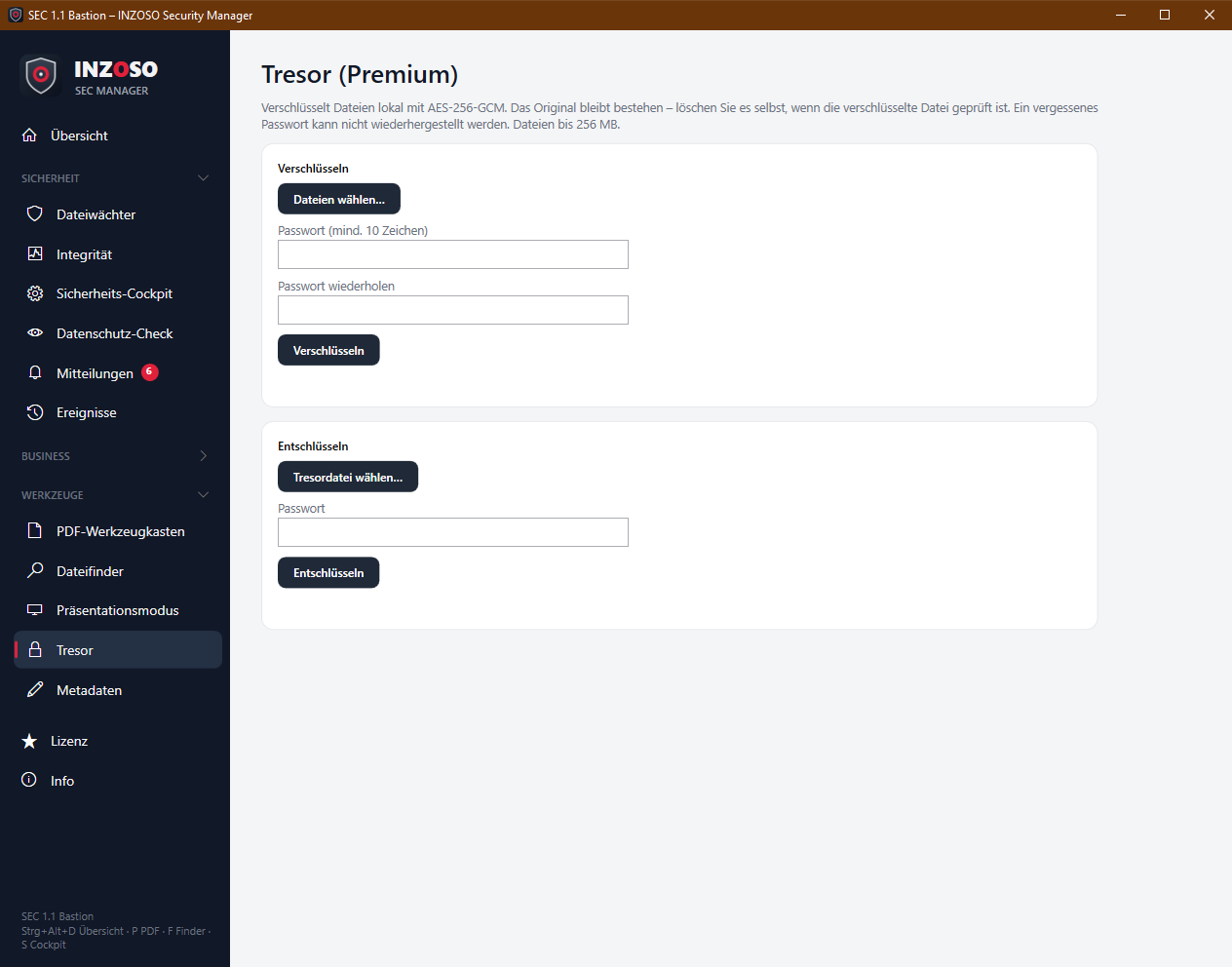
- “Dateien wählen…” (one or more).
- Enter a password (at least 10 characters) and repeat it.
- “Verschlüsseln.” For each file a file <name>.secvault is created next to the original. If it exists, “ (1)” is appended; nothing is overwritten.
Vault: decrypting
- “Tresordatei wählen…” (.secvault).
- Enter the password, “Entschlüsseln.”
- The file is saved with its original name in the folder <vaultname>_entschlüsselt next to the vault file.
- With a wrong password or a changed or damaged file the message is “Passwort falsch oder Datei beschädigt.” The two cannot be told apart technically. Changes to a vault file are detected reliably.
Vault: technique and notes
- Method: AES-256 in Galois/Counter mode (AES-GCM) with authentication.
- Key: from the password via PBKDF2-SHA256 with 600,000 rounds and a random salt.
- The file header contains method, rounds, salt, nonce and file name and is authenticated as well.
- Size: files up to 256 MB, larger ones are rejected (the file is processed in memory). Passwords are not stored.
- No password, no data. There is no back door and no recovery.
- The original is not deleted automatically. Note that simple deletion leaves traces on some media.