What attack detection is
Attack detection is included in the Basis edition and on by default. It scores events on your computer with fixed, traceable rules (no AI, nothing is sent), warns you with reasons and offers countermeasures. Only what you confirm is executed. Nothing happens automatically.
It complements antivirus and firewall and does not replace them. All screenshots show invented demo data.
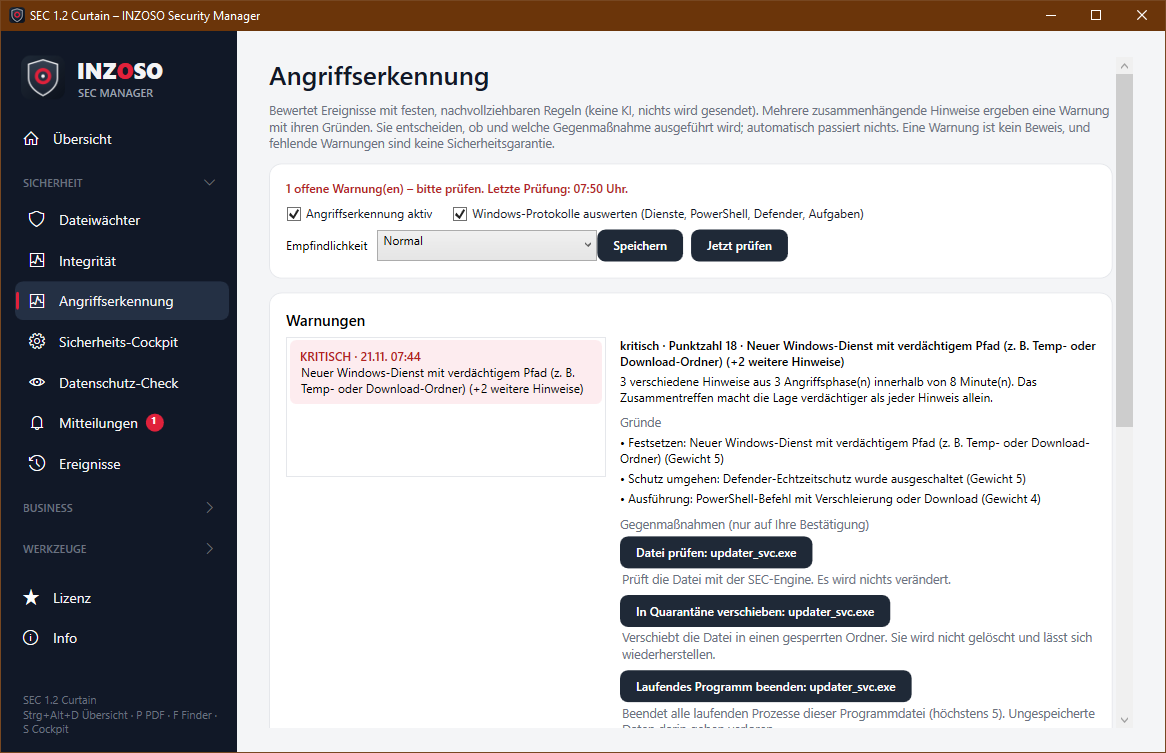
What is evaluated
Every event gets a weight from 1 to 15 and an attack phase (intrusion, execution, persistence, defence evasion, damage):
- Ransomware behaviour: many files changed in a short time (critical). Plus a slow stage: if files are renamed or changed steadily over 5 minutes, for example by appended extensions, SEC reports a suspicion (weight 8).
- Windows logs: new service (weighted higher for a suspicious path such as Temp or Downloads), conspicuous PowerShell command, new scheduled task, Defender detection, Defender real-time protection switched off, changed Defender exclusion.
- Autostart, scheduled tasks, hosts file, administrators group: new or changed entries are reported, without administrator rights and also in the Basis edition.
- Integrity, SEC engine, USB, security settings: new autostart entries, services or accounts, a detection in the file guard or download folder, a conspicuous drive or a weakened setting.
How a warning arises
- Hints that are at most 30 minutes apart or concern the same file form a situation. This also applies if hours lie between an autostart entry and a Defender detection of the same file (observation window 24 hours).
- Score = sum of the weights of distinct hints plus 2 points for each further attack phase. The same thing counted repeatedly counts once. Integrity deviations alone, typical after installations and updates, contribute at most 4 points and do not lead to a high warning without another source.
- Levels at sensitivity “Normal”: from 3 listed, from 5 medium (you are notified), from 8 high, from 12 critical. “Low” and “High” shift the thresholds.
- Every warning states its reasons. If a situation gets worse you are warned again even if you had hidden it.
- A single harmless hint stays below the warning threshold. Several hints in different phases (obfuscated PowerShell command, new service in the Temp folder, Defender switched off) result in a critical warning.
Working together with Microsoft Defender
Defender takes precedence. Microsoft Defender blocks and removes malware in real time. SEC Manager does not replace it but reads its state and detections (without administrator rights, read-only) and takes over the deep analysis.
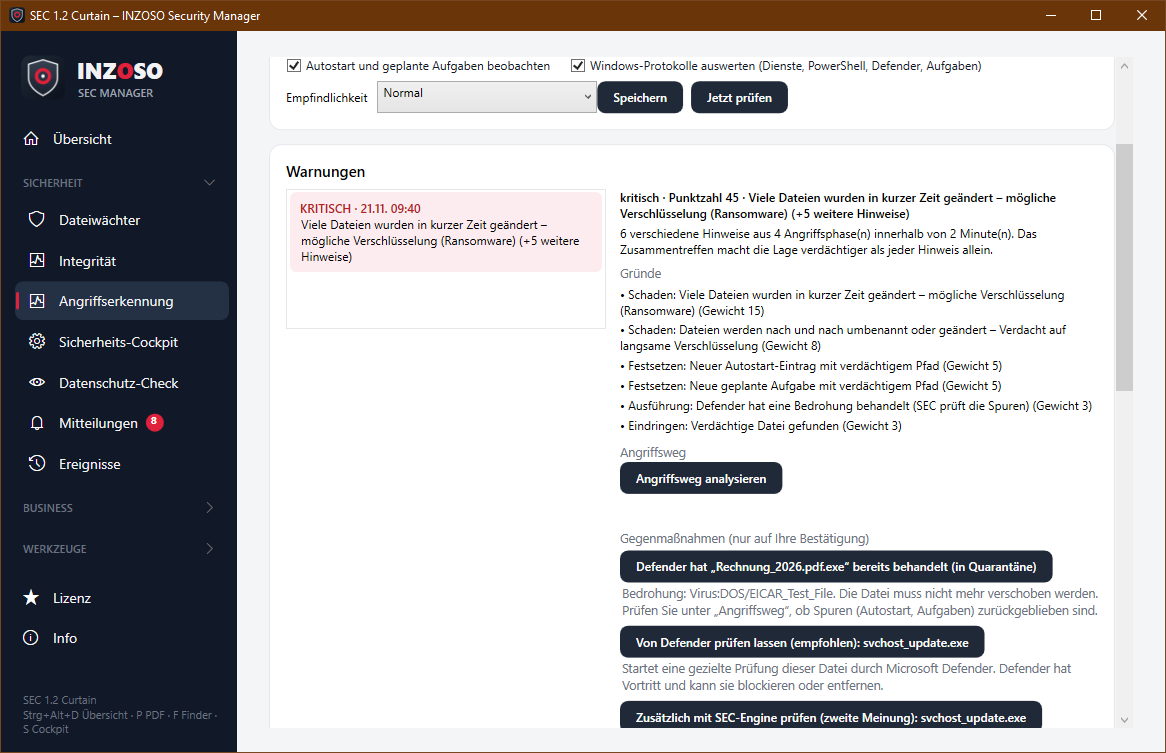
- State: If real-time protection is off, SEC treats it as a warning (phase “defence evasion”) and works on its own until then.
- Detections: Defender detections appear in the event log with threat name, action and the process involved. A detection handled by Defender counts little (weight 3), an unhandled one a lot (weight 7). Older detections at the first start count as history.
- Countermeasures: The Defender scan comes first (“recommended”), the SEC engine is the second opinion. If Defender has already handled a file, SEC no longer offers its own quarantine but checks the traces.
- No double reports: as long as Defender can be read, its detections are not counted again from the Windows event log. The cooperation can be switched off. If another product is the active antivirus, SEC works on its own.
The attack path
For every warning, “Analyse attack path” (read-only, local only) reconstructs what happened, ordered by phase:
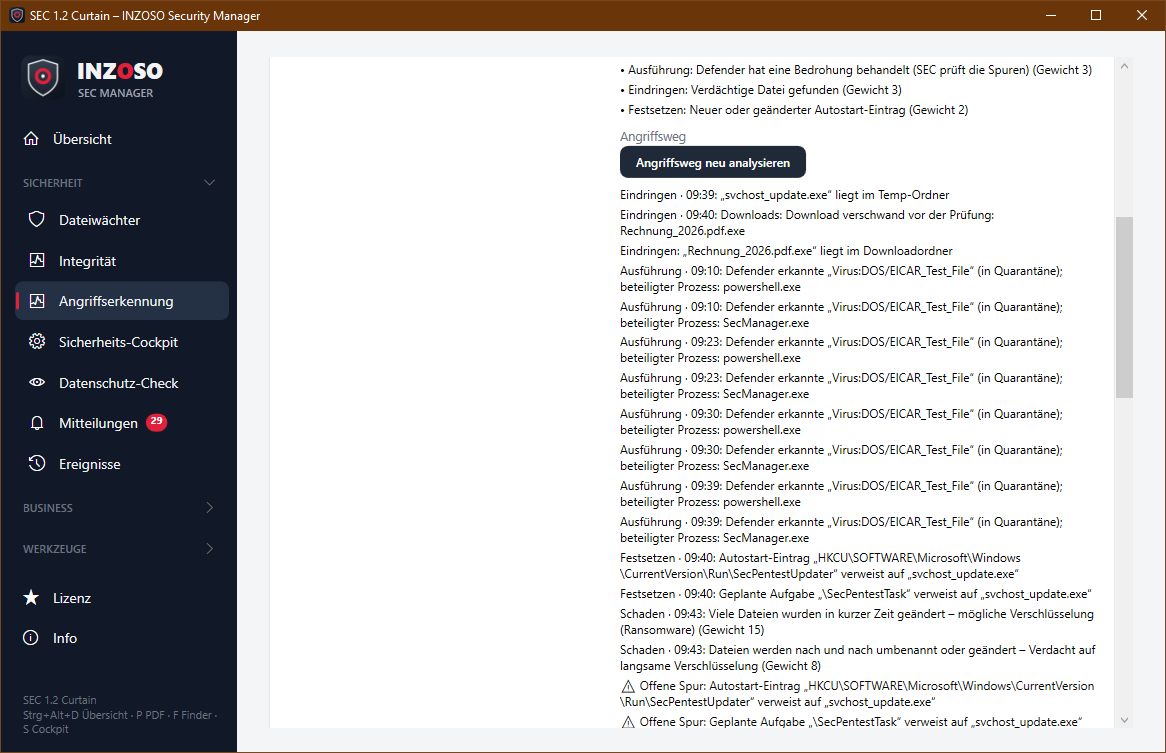
- Intrusion: where the file came from (mark “from the internet” with address, download folder, Temp folder, USB drive).
- Execution: Defender detections with time, action and the process involved, plus matching events.
- Persistence: autostart entries and scheduled tasks that point to the file.
- Findings and open traces: size, checksum (SHA-256), signature, running processes and above all what is still open, for example an autostart entry although Defender removed the file long ago. Plus a recommendation.
Countermeasures
For every warning the page shows suitable measures with an explanation. The program asks before executing.
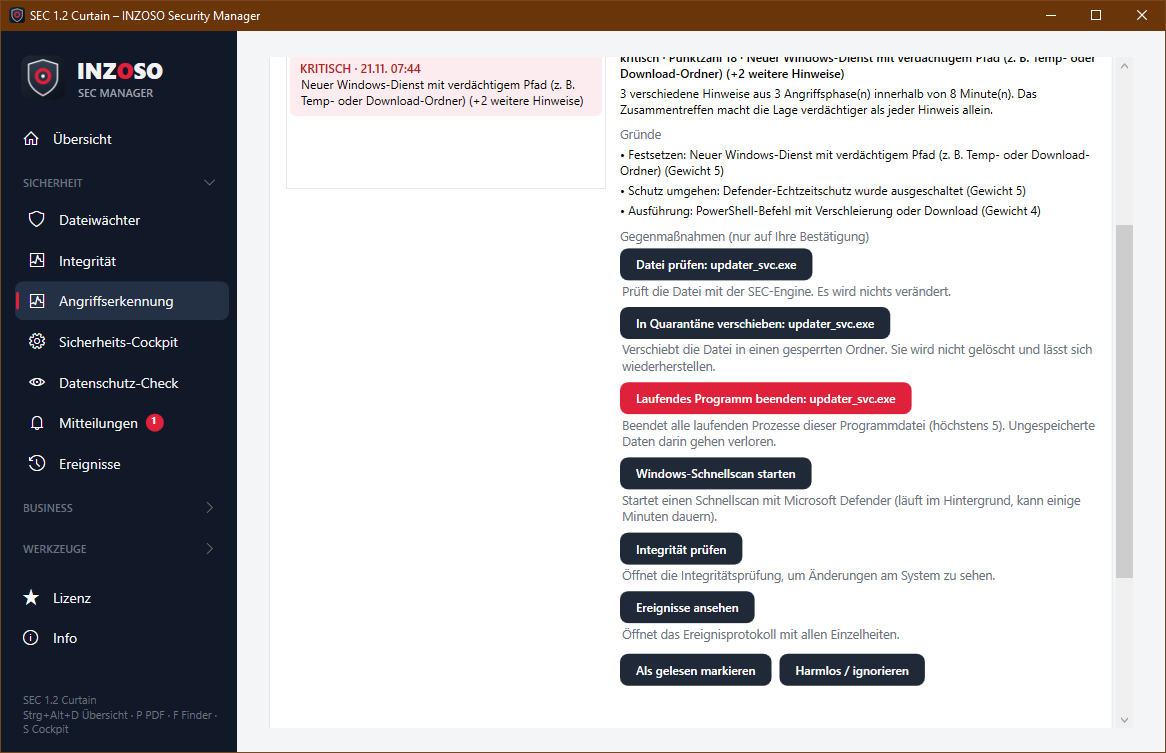
- Scan file: scan with the SEC engine, changes nothing.
- Move to quarantine: the file goes into a locked folder, is not deleted and can be restored.
- End running program: ends processes of this program file (at most 5). Unsaved data in it is lost.
- Windows quick scan with Microsoft Defender, plus “Check integrity” and “View events”.
- Hints such as “disconnect the network” for ransomware or “change passwords” for account changes are only displayed.
- Safety limits: files in the Windows or Program Files folder and the SEC Manager program file itself are never touched. The target must occur in the observed events. Every executed measure appears in the event log.
Settings
- Attack detection active and Work together with Microsoft Defender (each on/off).
- Watch autostart and scheduled tasks: compares every few minutes with the state at first start, without administrator rights.
- Evaluate Windows logs: reads the logs readable for users every 5 minutes (services, PowerShell, Defender, scheduled tasks). Nothing is changed.
- Sensitivity: Low, Normal, High.
- Harmless / ignore: hides a warning; it is reported again only if it gets worse. This helps after installations and updates.
Limits you should know
- Runs only while the program is running.
- Sees only what this user may read: not the Windows Security log (logons, process starts) and no network data. Defender exclusions are not readable without administrator rights.
- A warning is not proof, missing warnings are no guarantee. False alarms are possible, for example after installations.
- Measures concern files and programs, not network or accounts. For those there are only hints.
- Rules, weights and thresholds are fixed and not yet adapted to your environment. Very slow attacks or attacks spread over many hours without a common file can stay below the thresholds.